Crypto Portfolio Tracker That Doesn't Need an Account
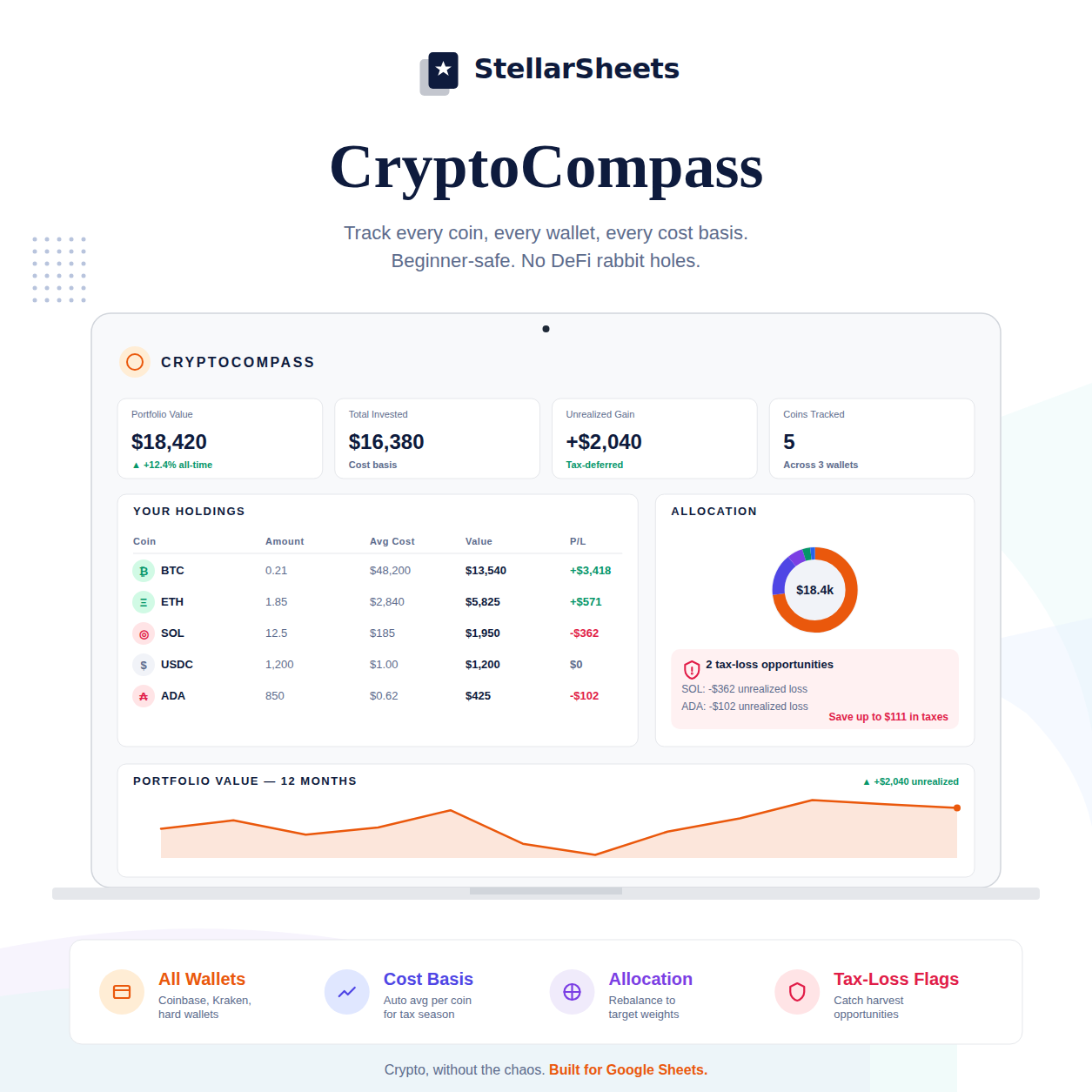
Every Crypto Tracker Wants Your Email, Your Phone Number, and Access to Your Wallet
Crypto portfolio trackers have a business model problem: the free ones monetize through your data, the paid ones charge monthly fees, and the ones that connect directly to your wallet or exchange require permissions that make security-conscious investors uncomfortable. You're trying to track your portfolio, not sign up for another service that knows everything about your holdings.
There's a simpler way. A Google Sheets crypto tracker gives you complete visibility into your portfolio — every coin, every wallet, every cost basis — without an account, without credential sharing, and without a subscription.
What a Crypto Portfolio Tracker Actually Needs to Do
Track holdings across multiple wallets and exchanges — most serious crypto investors hold assets in more than one place. Your tracker needs to consolidate everything into one view.
Calculate your cost basis per coin — if you've bought Bitcoin at multiple prices over time, your cost basis is the weighted average of all purchases. This is what determines your taxable gain when you sell.
Show unrealized gain/loss in real time — current value minus cost basis, updated with current prices.
Flag tax-loss harvesting opportunities — positions currently below your cost basis that could be sold to realize a loss and offset gains elsewhere.
Track portfolio allocation — what percentage of your portfolio is in each asset, so you can rebalance intentionally rather than reactively.
The Cost Basis Problem Most Crypto Investors Ignore
If you've been buying crypto for more than a year, you almost certainly have a cost basis problem. Multiple purchases at different prices, transfers between wallets, staking rewards, airdrops — each of these affects your cost basis and your tax liability in different ways.
The IRS treats crypto as property. Every sale, swap, or spend is a taxable event. Your gain or loss is calculated against your cost basis using the method you choose (FIFO, LIFO, or specific identification). Without a tracker that logs every acquisition with its date and price, you're guessing at your tax liability — and guessing wrong is expensive.
Crypto in Your Overall Portfolio
Most financial planners recommend keeping crypto to 5–10% of a diversified portfolio. Your crypto tracker should show not just your crypto allocation within crypto, but crypto as a percentage of your total investable assets. For a complete picture that includes stocks, ETFs, and crypto in one dashboard, see Portfolio Tracker Google Sheets: Track Stocks, ETFs, and Crypto in One Place.
How to Set Up a Crypto Tracker in Google Sheets
- Create a holdings tab: coin, wallet/exchange, quantity, purchase date, purchase price, current price, current value, cost basis, unrealized gain/loss
- Use GOOGLEFINANCE or a crypto price API to pull live prices (or update manually weekly)
- Create a transactions log: date, type (buy/sell/transfer/stake), coin, quantity, price, fees
- Calculate weighted average cost basis per coin from the transactions log
- Add a portfolio summary: total invested, current value, total unrealized gain/loss, allocation by coin
- Flag positions below cost basis for tax-loss harvesting review
The Privacy Advantage
Your crypto holdings are nobody's business but yours. A Google Sheets tracker keeps your portfolio data in your Google Drive — not on a startup's servers, not connected to your exchange via API, not accessible to anyone who compromises a third-party app. You update it manually, which takes about 10 minutes a week. That's a reasonable trade for complete privacy.
Frequently Asked Questions
How do I track crypto portfolio in Google Sheets?
Create a holdings tab with one row per coin per wallet/exchange. Log quantity, purchase date, purchase price, and current price. Use IMPORTXML or manual updates for current prices. Calculate cost basis as total invested divided by total units. Add a summary tab showing total value, total gain/loss, and allocation by coin.
How is crypto taxed in the US?
The IRS treats cryptocurrency as property. Every sale, swap, or use of crypto to purchase goods/services is a taxable event. Short-term gains (held under 1 year) are taxed as ordinary income. Long-term gains (held over 1 year) qualify for lower capital gains rates (0%, 15%, or 20% depending on income).
What is tax-loss harvesting in crypto?
Tax-loss harvesting means selling a crypto position that's below your cost basis to realize a loss, which can offset capital gains elsewhere in your portfolio. Unlike stocks, crypto is not subject to the wash-sale rule — you can sell at a loss and immediately repurchase the same coin. Your tracker should flag all positions below cost basis for this review.
What is the best free crypto portfolio tracker?
Google Sheets is the best free crypto tracker for privacy-conscious investors. It requires no account, no API access, and no credential sharing. The trade-off is manual price updates. For investors who want automatic price syncing, CoinGecko and CoinMarketCap offer free portfolio tracking with account creation required.
How do I calculate my crypto cost basis?
For each coin, divide your total amount invested (in USD) by the total number of units purchased across all transactions. This is your weighted average cost basis. When you sell, your taxable gain is the sale price minus this average cost basis (using the average cost method). For FIFO or specific identification, you need to track each purchase lot separately.
Ready to Put This Into Action?
The math behind freedom is simple. The CryptoCompass – Crypto Portfolio Tracker tracks every coin, every wallet, your cost basis, and tax-loss harvesting opportunities — all in one pre-built Google Sheet. No account. No API access. No subscription. Instant download, yours forever.
Or browse the full Savings & Investing Templates collection to find the right tool for your situation.
-
Posted in
bitcoin, crypto, google sheets, portfolio tracker, tax-loss harvesting